Most developers spend more time debugging poorly documented endpoints than actually building their core application logic. It's a common bottleneck in automation workflows where a single failed OTP verification can stall an entire user onboarding process. You likely already know that unreliable API uptime and complex integration requirements for simple SMS receiving are more than just minor inconveniences; they're operational risks that compromise project timelines and digital privacy standards.
This guide provides the clear, pragmatic virtual number api documentation you need to integrate Anosim's services with technical confidence. We'll bypass the typical marketing fluff to focus on the utility of the Anosim v1 and SMS-Activate Standard API protocols. You'll learn how to master the technical implementation of inbound SMS and virtual number management for seamless automation. By the end of this walkthrough, you'll have a working integration that delivers reliable inbound SMS for OTPs. We'll examine everything from initial authentication via API keys to advanced rental management, ensuring your infrastructure remains stable and secure through 2026 and beyond.
Key Takeaways
- Identify the optimal integration path by comparing the high-speed native Anosim v1 API with the industry-standard compatible interface.
- Secure your connection using environment variables and regional base URLs found within the virtual number api documentation.
- Streamline automated verification workflows by programmatically selecting service types and parsing inbound SMS responses.
- Expand your technical infrastructure with long-term number rentals managed through the API.
- Maintain production stability by implementing robust error handling for status codes and using exponential backoff for failed requests.
Table of Contents
- Understanding the Anosim API Architecture: v1 vs. Standard
- Authentication and Initializing Your API Connection
- Automated SMS Activation Workflow: Get Number to Get Code
- Integrating Long-Term Rental APIs
- Optimization, Error Handling, and Production Deployment
Understanding the Anosim API Architecture: v1 vs. Standard
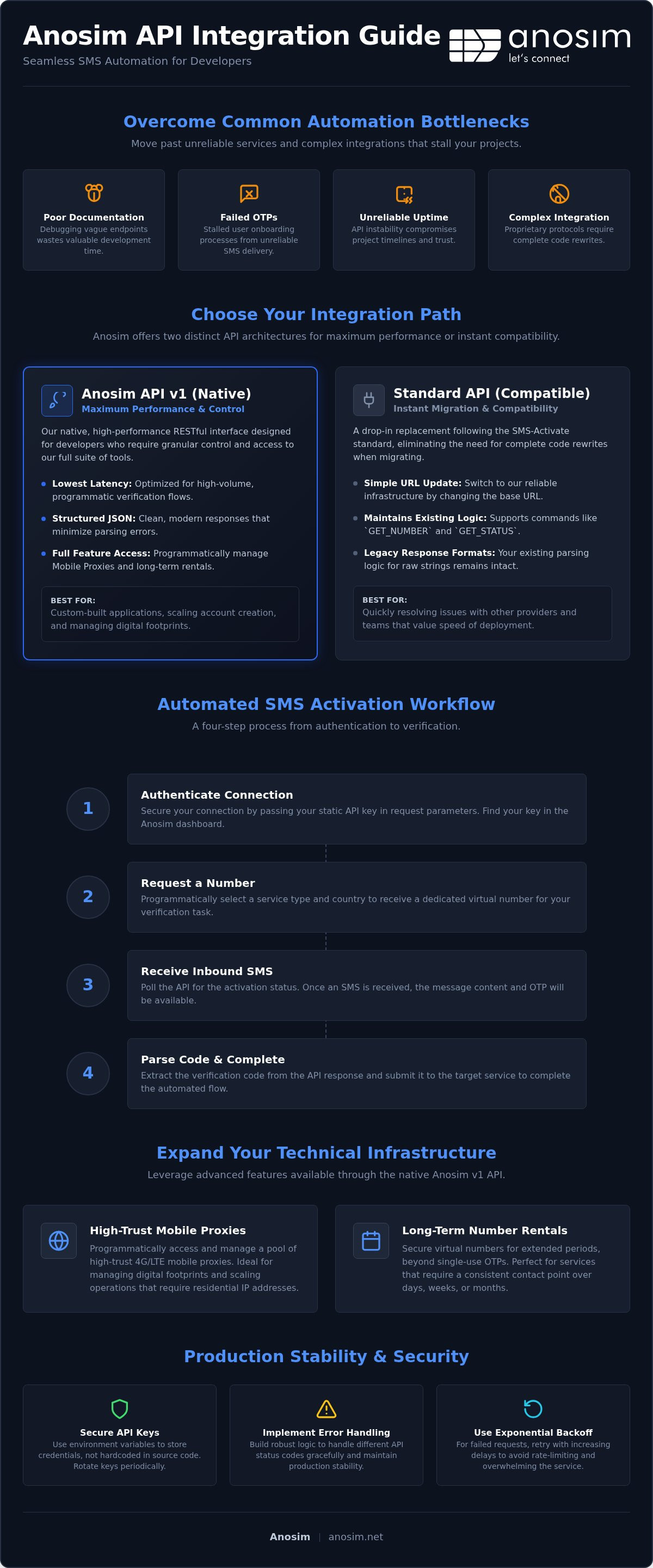
Anosim provides two distinct integration paths to accommodate different development environments. While some platforms force a proprietary protocol, we maintain a dual-architecture approach. This ensures that whether you're building a bespoke verification engine or migrating from a legacy provider, the integration remains efficient. It's important to remember that our infrastructure focuses exclusively on inbound SMS; we don't support outgoing messages or physical SIM delivery. Centralizing your virtual number api documentation review on these two paths allows you to choose between maximum performance or maximum compatibility.
When to use Anosim API v1
The Anosim API (v1) is our native, high-performance interface. It's designed for developers who require granular control over the lifecycle of a virtual number. If your application handles high-volume, programmatic verification flows, v1 offers the lowest latency for inbound SMS activations. This version is optimized for modern RESTful environments, using structured JSON responses that minimize parsing errors.
Beyond simple activations, the v1 path also lets you rent numbers and manage your orders programmatically, including long-term Rent Number services. It's the best choice for custom-built applications that need to scale bulk verification workflows. The v1 architecture ensures that as your volume grows, your API calls remain stable and responsive.
The 'Drop-in' Standard API for Instant Migration
Many automation scripts and verification bots are hardcoded to follow the SMS-Activate standard. To eliminate the need for complete code rewrites, we offer the SMS-Activate Standard API compatibility. You can switch to our infrastructure by simply updating your base URL in your configuration file. This path is a pragmatic solution for teams that value speed of deployment over custom feature sets.
This compatibility layer maintains existing logic for common commands like 'GET_NUMBER' and 'GET_STATUS'. It's the fastest way to resolve issues with unreliable uptime or poor documentation found with other providers. Because the response formats match industry standards, your existing parsing logic remains intact. You won't need to refactor your handling of raw string responses or status polling. Accessing our virtual number api documentation for the alternative v1 path shows exactly how to map your current requests to our endpoints without breaking your existing workflow.
The primary differences between these two paths lie in endpoint structure and data response formats. The native v1 API uses descriptive endpoints and JSON objects, while the Standard API adheres to the legacy query parameter style. Choosing the right path depends on your existing codebase and whether you prefer structured JSON responses or the legacy string format.
Authentication and Initializing Your API Connection
Establishing a secure connection is the baseline for any programmatic verification system. Following established government API standards ensures that your integration is robust and follows security best practices. When reviewing the virtual number api documentation, you'll see that authentication is handled via a static API key passed in your request parameters. This method is efficient and avoids the overhead of complex token exchange protocols, keeping your implementation lightweight and fast.
Generating and Managing API Keys
You can locate your unique credential by logging into the Anosim dashboard. For production environments, don't hardcode this key directly into your scripts. Use environment variables to keep your credentials separate from your source code. Security is a priority, so treat your API key with the same level of protection as a password to prevent unauthorized account access.
We provide specific base URLs depending on whether you're using the native v1 API or the Alternative v1 compatibility layer. Ensure your configuration points to the correct endpoint to avoid routing errors. As you scale your operations, pay attention to request throttling. While our infrastructure is built for high volume, hitting the API too aggressively can trigger 429 status codes. Implementing a basic retry logic with jitter helps you maintain throughput without service interruptions or temporary IP bans.
Request and Response Formats
The native v1 API standardizes on JSON for all responses. This makes it easy to parse data into objects within your application. In contrast, the Alternative v1 API uses plaintext or colon-separated strings to maintain compatibility with legacy tools. You should always check the HTTP status code of every response. A 200 OK status indicates a successful handshake, but you must still parse the body for API-specific error strings. Standardizing your error handling logic early saves significant debugging time during production deployment.
Before deploying a full activation workflow, perform a simple 'Get Balance' request. This is the fastest way to verify that your authentication is working and that your account has sufficient funds. If the API returns your current balance, your connection is properly initialized. You're now ready to begin automating your SMS activations with confidence. This simple handshake test confirms that your virtual number api documentation implementation is correct before you start requesting live numbers.
Automated SMS Activation Workflow: Get Number to Get Code
The core utility of the virtual number api documentation lies in its ability to automate the entire lifecycle of an SMS activation. Unlike manual processes, a programmatic workflow ensures that verification codes are captured and processed in real-time. This process follows a logical sequence: discovery, acquisition, polling, and completion. By adhering to the structured endpoints in the Anosim v1 or Standard API, you can build a resilient system that handles activations without manual oversight. It's a pragmatic approach to scaling account verifications while maintaining digital privacy.
Step 1: Fetching Available Services and Pricing
Before requesting a number, your application should query the current inventory and pricing. Using the /ProductPrices endpoint allows you to programmatically retrieve a list of supported services like Telegram, Google, or WhatsApp. It's essential to use standard ISO codes for country selection to ensure programmatic accuracy across different regions. By checking the availableCount field, you can prevent your script from attempting to rent numbers that are currently out of stock. This dynamic check helps you calculate costs before initiating a rental, ensuring your account balance is managed efficiently.
Step 2: Polling for the Verification Code
Once you've successfully executed a 'GET_NUMBER' command, the activation moves into the polling phase. You'll need to monitor the status of the activation to capture the inbound SMS. Setting an optimal polling interval is critical; checking every 5 to 10 seconds is usually sufficient to capture the code without hitting rate limits or wasting API credits. You don't want to poll too aggressively and risk a temporary IP block.
A robust implementation includes timeout logic. For instance, if a code isn't received within 120 seconds, your script should trigger a cancellation request. Some services require multiple messages or two-factor codes; your polling logic must be capable of handling incremental updates to the status field until the transaction is finalized. This ensures you capture the full data payload required for successful account verification.
Step 3: Handling Refunds and Cancellations
Not every activation attempt will result in a successful SMS delivery. If a service fails to send a code, you can programmatically cancel the number to free up your resources. For refund eligibility details, you can review our FAQ.
Integrating Long-Term Rental APIs
Managing Long-Term Number Rentals
Some platforms require ongoing access to a number for recurring security checks or two-factor authentication. In these scenarios, short-term activations are insufficient. You can use the API to manage Rent Number services that run from 1 day up to 360 days. This dedicated access ensures you don't lose control over established accounts. The system allows you to extend these periods before they expire, providing a stable long-term communication channel.
The API provides specific commands to extend rental periods, which prevents the loss of numbers used for critical accounts. If your verification workflow depends on inbound voice calls rather than text, the Rent Mobile VoIP service covers that case; it is booked on the website, not through the API. You can Explore Rent Number for long-term options to secure your digital assets for the future.
Optimization, Error Handling, and Production Deployment
Moving from a development sandbox to a production environment requires a shift from simple requests to a resilient, fault-tolerant architecture. While initial tests often focus on successful handshakes, production stability depends on how your application handles the edge cases defined in the virtual number api documentation. Security hardening is the first step in this transition. Keep your API key out of source code, logs and shared repositories so it cannot leak. This pragmatic approach ensures that your infrastructure remains secure as you scale from single-threaded tests to bulk activations.
Error Handling Logic for Automation
Your application must be capable of mapping Anosim error strings to internal logic to avoid hung processes. For example, a response saying that no numbers are in stock shouldn't trigger a hard stop. Instead, your script should catch it and automatically attempt a request using an alternative country ISO code. This ensures your automation continues without manual intervention. You also need to distinguish between temporary network issues and account-level restrictions. An invalid key or an empty balance requires an immediate alert to your DevOps team, whereas a waiting status simply indicates that the activation is active and your polling logic should continue.
Implementing exponential backoff is a standard requirement for high-volume production deployment. If a request fails due to rate limiting or a temporary timeout, your application shouldn't immediately retry. Instead, wait for a short interval and gradually increase the delay between subsequent attempts. This prevents your IP from being flagged for aggressive behavior and maintains a stable connection with our global endpoints. As you move to bulk operations, this logic becomes the difference between a reliable verification engine and one that frequently triggers 429 status codes.
Monitoring and Logging
Implement comprehensive logging for every API call. Tracking your usage by service and country allows for precise cost auditing and helps identify which regions provide the highest success rates for your specific use case.
If your project requires high-volume integration support or custom architectural advice, you can visit the Anosim Partner page. This resource is designed for enterprise-level users who need to optimize their workflows for maximum throughput. By combining robust error handling with proactive monitoring, you ensure that your virtual number api documentation implementation remains a silent, reliable partner in your digital operations. Success in production isn't just about making the first call; it's about managing the thousandth call with the same level of technical precision.
Scaling Your Verification Infrastructure
Implementing a robust verification system requires a balance of speed, security, and global reach. You now have the technical foundation to choose between the high-performance native v1 API or the seamless migration path offered by our standard-compatible interface. By following the virtual number api documentation, you can ensure your automation remains resilient against common production hurdles like rate limiting and IP flagging.
Whether you're handling one-time activations or managing long-term rentals for recurring 2FA, the tools are ready for deployment. This dual-API compatibility means you can switch from legacy providers without friction and start scaling your operations immediately.
Reliable inbound SMS automation is no longer a bottleneck for your project's timeline. You have the endpoints, the error handling logic, and the security best practices needed to maintain a high-trust digital footprint. Start building with the Anosim API today and turn your verification workflow into a silent, efficient asset.
Frequently Asked Questions
How do I get my Anosim API key for the first time?
You can find your API key within the Anosim dashboard after creating an account. Once logged in, navigate to the API settings section where your unique credential is displayed. It's essential to treat this key as a password and store it in environment variables rather than hardcoding it into your application logic. If you're following the virtual number api documentation, this key is required for every request to authenticate your account and authorize service rentals.
Is the Anosim API compatible with the SMS-Activate protocol?
Yes, Anosim provides full compatibility with the SMS-Activate protocol through the SMS-Activate Standard API (Alternative v1). This allows you to migrate existing automation scripts by simply updating the base URL in your configuration. It maintains standard command structures like 'GET_NUMBER' and 'GET_STATUS', making it a drop-in replacement for developers who want to leverage our global infrastructure without refactoring their entire codebase. You'll find this ensures zero-friction transitions between providers.
What is the difference between the v1 and Alternative v1 API documentation?
The native Anosim API (v1) uses a modern RESTful architecture with structured JSON responses, offering granular control over orders and rentals. The Alternative v1 documentation describes a legacy-compatible interface that returns data in plaintext or colon-separated strings. While both provide access to our virtual number api documentation resources, v1 is recommended for new custom builds, while Alternative v1 is optimized for rapid migration from other existing virtual number providers.
Can I use the API to receive SMS from any service, like Tinder or Telegram?
You can receive inbound SMS from a wide range of platforms, including Telegram, Tinder, and Google. The specific availability of these services depends on the current inventory in the requested country. Use the '/ProductPrices' endpoint to programmatically check which services are active and see the available count for each. Please note that our system is strictly inbound-only; we don't support outgoing messages or physical SIM card delivery for any service, regardless of the platform.
What happens if my API call for a number returns 'NO_NUMBERS'?
The 'NO_NUMBERS' response indicates that the specific country and service combination you requested is currently out of stock. To handle this in a production environment, your error handling logic should automatically attempt the request using an alternative country ISO code. This programmatic fallback ensures your automation continues without manual oversight. You can also query the available count beforehand to verify stock levels across different regions before initiating a rental request to avoid this error entirely.
Is there a way to test the API for free before adding a balance?
The API requires a positive account balance to execute most commands, including number requests and rentals. While there isn't a dedicated free testing mode, you can verify your authentication and connection logic using the 'Get Balance' endpoint without incurring any costs. This allows you to confirm that your virtual number api documentation implementation is correct and that your API key is properly recognized by our servers before you commit to a full production workflow.
How do I handle multiple SMS codes for the same number via the API?
Handling multiple verification codes requires your polling logic to remain active after the first SMS is received. Instead of closing the transaction immediately, your script should continue checking the status endpoint until all required codes are captured or the rental period expires. This is useful for services that require two-factor authentication or a secondary confirmation code. Our system will append new messages to the status response as they arrive during the active activation window for your convenience.