A free proxy can hide your IP address while exposing the activity you meant to keep private. A proxy sits between your device and a website, forwarding your requests; approximately 80% of free proxy servers do not support HTTPS. That’s why free proxies are a security risk, particularly when they handle logins or other sensitive data.
The appeal is clear: a proxy that costs nothing can seem like an easy way to browse through another IP address. But the low price may come with trade-offs in privacy, security, and reliability. This article explains how proxies route traffic and what an operator may be able to see or change along the way.
You’ll learn how weak encryption and proxy logging can expose cookies, credentials, and browsing activity, and why a changed IP address doesn’t guarantee anonymity. We’ll also examine the risks behind the apparent affordability, so you can judge when a free proxy is unsuitable for sensitive tasks.
Key Takeaways
- Assess what a proxy operator can observe or alter before routing sensitive activity through its server.
- Protect account access by understanding how intercepted cookies may be used to impersonate you.
- Look beyond a changed IP address: tracking, weak encryption, and traffic redirection can still expose browsing activity.
- Consider the trade-offs behind a free service, including shared public IPs, unreliable connections, and advertising-supported operations.
- Use a proxy cautiously for sensitive tasks, and choose a setup with security controls suited to the traffic it handles.
Table of Contents
- How proxies route and intercept traffic
- Cookie hijacking and account credentials
- Data tracking and lack of encryption
- How public and open proxies operate
- Free proxies’ perceived affordability
- Anosim: SMS Activation
How proxies route and intercept traffic
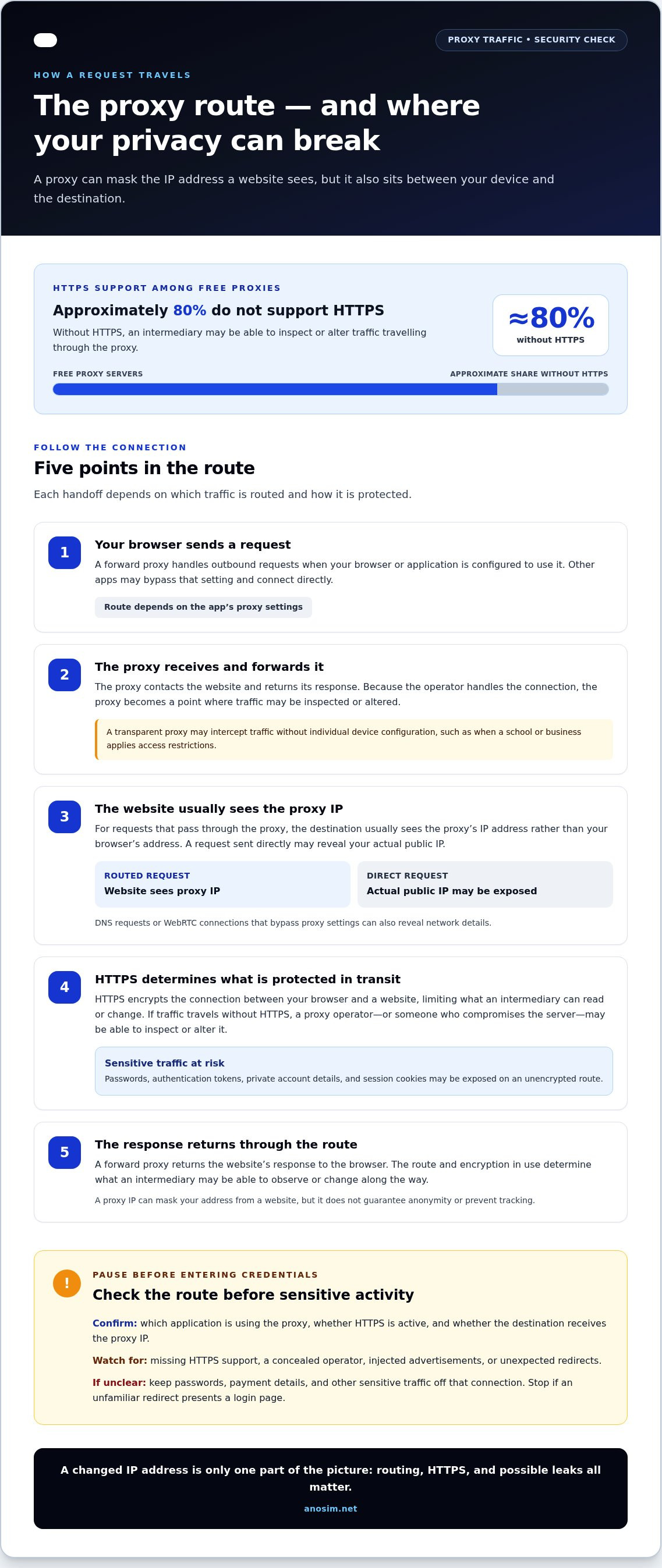
A proxy receives a browser request and forwards it to a website, placing its server between the user and the destination. This can help mask an IP address, but it also creates a point where traffic may be inspected or altered.
Traffic Routing Through Proxies
A forward proxy handles outbound requests: your browser sends a request to the proxy, which contacts the website and returns its response. The website usually sees the proxy’s IP address rather than your browser’s address. The proxy operator handles the connection, but a misconfigured browser or application may send some requests directly instead.
For example, a browser configured to use a proxy may route website traffic through it while a separate application bypasses that setting. A transparent proxy can intercept traffic without individual device configuration, as when a school or business applies internet access restrictions. In either case, the routing setup determines which requests pass through the proxy server.
HTTPS Support and Sensitive Traffic
HTTPS encrypts the connection between a browser and a website, limiting what an intermediary can read or change in transit. Approximately 80% of free proxy servers do not support HTTPS. If a request travels without HTTPS, the proxy operator or someone who compromises the server may be able to inspect or alter its contents.
The risk is greatest when traffic contains a password, authentication token, or private account details. Even when a proxy supports HTTPS, its role and configuration matter: an HTTPS tunnel protects the connection to the website, while a proxy designed to inspect encrypted traffic may handle it differently. Treat an unclear HTTPS setup as unsuitable for sensitive activity.
IP Address and Location Exposure
A proxy can replace the IP address a website sees with its own, but only for requests routed through that proxy. If your browser sends a request directly, the destination may see your actual public IP address. A DNS request or WebRTC connection that bypasses proxy settings can also reveal network details outside the intended route.
Location signals may also remain imperfectly masked. A website may infer a general location from an exposed IP address, while a proxy’s IP may point to the proxy server’s location instead. Residential proxies use IP addresses associated with real ISP-issued connections, but that does not prevent leaks if other traffic bypasses the proxy.
Warning signs include a free proxy that lacks HTTPS support, conceals its operator, injects advertisements, or redirects you to unexpected pages. For example, an unfamiliar login page after a redirect is a reason to stop before entering credentials. Injected ads can also carry malware.
For blocked websites, safer options depend on the access rules: use an approved VPN or a managed proxy that supports HTTPS when access is authorized. A VPN encrypts device network traffic, while a proxy generally handles traffic from configured applications. Neither makes bypassing an organization’s access controls appropriate.
Before routing a request, identify the application using the proxy, confirm that HTTPS is active, and check whether the destination receives the proxy IP. If those settings are unclear, keep passwords, payment details, and other sensitive traffic off that connection.
Cookie hijacking and account credentials
A session cookie helps a website recognize a browser after login. For example, an email service may use a cookie to keep your inbox open without asking for your password on every page. If a free proxy handles that website traffic, its operator may be able to intercept cookies containing login information or credentials.
The risk goes beyond someone learning your password. A stolen session cookie may act like a temporary access token, allowing an attacker to impersonate the signed-in user and reach accounts or data. If someone captures a cookie for a work dashboard, they may gain access without entering the account password again.
HTTPS can protect data travelling between your browser and a website, but a proxy that lacks HTTPS support may leave traffic exposed. The outcome depends on the route and encryption in use. Logging in to a bank or cloud account through an untrusted, unencrypted proxy gives the operator an opportunity to capture credentials or session data.
Not every proxy operator steals information, but an unknown operator’s intentions and safeguards are hard to assess. Some free proxy services may track activity, redirect users, or inject advertisements. A malicious redirect that imitates a familiar login screen can trick someone into entering a password, and injected ads may carry malware.
Residential describes an IP address type, not a security guarantee. A residential proxy can still be operated in ways that expose traffic, just like a public proxy. Treat an unfamiliar service as a possible intermediary, not a trusted security layer, especially when signing in to email, payment, or workplace websites.
Account activity can offer clues. An unexpected sign-in alert, an unfamiliar active session, or a sudden password reset message deserves attention. These signs don’t prove a proxy caused the event, but they may indicate compromised credentials or cookies. Review account activity through the website’s official settings, not a link in an unexpected message.
If you suspect exposure, use the affected website’s security settings to end active sessions, change your password, and enable additional sign-in protection where available. Then remove the free proxy from your browser or software settings before logging in again. For verification that requires a separate number, a rented number can receive the code, but it does not protect cookies or replace secure browsing.
Data tracking and lack of encryption
A free proxy can create a detailed record of the traffic passing through its server. A request to a search engine, for example, may reveal visited pages, timestamps, and device or browser details. The operator may log this activity, use it to build browsing profiles, or share it with advertisers. Changing an IP address doesn’t prevent the proxy from observing the requests it handles.
Logs can reveal more than a list of websites. A URL may contain search terms or account identifiers after a question mark, while a request may include technical details about the browser. If you access an online store through a proxy, its operator may learn which pages you requested and when. Poorly controlled logs can expose this activity to others with access to the proxy infrastructure.
Encryption affects what an intermediary can read. With HTTPS, the browser and website encrypt the content exchanged between them, but the proxy still handles connection details such as the destination domain. Free proxy services may lack strong encryption, and some may log activity, sell browsing data, or redirect traffic. A VPN encrypts network traffic from a device, while a proxy usually handles configured application traffic and doesn’t encrypt everything by default.
Free proxies may inject ads, tracking scripts, or redirects by modifying the web responses they handle. For example, a proxy could add advertising code to an unencrypted page; a malicious ad may then lead to malware or collect browsing information. Injection is harder when HTTPS encryption remains intact because the proxy can’t simply read and rewrite protected page content.
Tracking can also come from scripts added to a page. A tracking script may record page visits or browser interactions, then send those details to an advertising or analytics service. If the proxy inserts that code into a response, you may mistake it for part of the website. Unexpected pop-ups, altered page layouts, or redirects to unfamiliar login screens can signal interference.
To reduce exposure, match the protection to the task:
- Use HTTPS for account logins and other sensitive website activity.
- Avoid entering payment details through an unknown public proxy.
- Close pages that redirect unexpectedly or display unfamiliar login prompts.
- Remove proxy settings if browser traffic changes or intrusive ads appear.
These steps limit what an intermediary can capture, but they don’t make an unknown operator trustworthy. If a proxy provider controls the server, it may still observe connection metadata and accessible traffic. That distinction explains why free proxies are a security risk: the apparent privacy benefit may come with tracking, weak encryption, or altered web content. Choose a connection based on what information it can expose, not only on whether it masks an IP address.
How public and open proxies operate
Public proxies are servers anyone can use, often listed in open directories or collected from exposed systems. Some come from misconfigured infrastructure rather than a service built for public access. A listing usually gives users an address and connection details, but may reveal little about the operator, maintenance, or data-handling practices.
After connecting, users share the same proxy endpoint. Thousands of users may use one free proxy IP, so their requests appear to websites under a common address. That shared identity can obscure which person made a request, but it also links unrelated activity to the same IP and creates uncertainty about who controls the connection.
Websites monitor public IP addresses for suspicious or automated traffic. If an address is associated with abuse, a site may block it, issue CAPTCHA challenges, or restrict access. A legitimate user can then inherit the effects of someone else’s activity. This can disrupt ordinary browsing and make a shared proxy unreliable for account access.
Open access also complicates accountability. A proxy provider may not be identifiable from a public listing, and an exposed server may have no clear owner monitoring its use. Since the operator handles traffic, users cannot assume that requests or connection records remain private. Sensitive data sent through an unmanaged endpoint may be exposed to its controller or anyone who has compromised it.
Public proxy IPs can also change how websites respond to data requests. A site owner may direct requests from a known public proxy to a honeypot, a decoy environment that returns fake information. For example, a data collector could mistake fabricated product details for real market information and make a business decision based on inaccurate results.
For an organization, an unauthorized proxy creates another concern: it can become an unmanaged entry point into internal operations. If an employee routes work traffic through an unknown server, access controls and monitoring may not cover that path. Organizations should restrict access to proxy infrastructure, protect logs, and monitor for unusual traffic.
Before using a public proxy, consider what the task sends and what failure would mean. Avoid routing internal documents, account sessions, or customer records through an open endpoint. For public research, treat returned data as unverified if a website could be serving proxy users a decoy.
- Check whether the proxy has a clearly identified operator and a defined purpose.
- Keep sensitive data and internal services off unmanaged proxy connections.
- Watch for CAPTCHA loops, blocked pages, or results that conflict with other observations.
A changed IP address is only one part of privacy. Shared access, unknown control, and altered responses can create risks that remain invisible during routine browsing. Understanding who operates the endpoint, what traffic it handles, and how websites treat its IP helps you judge whether a public proxy suits the task.
Free proxies’ perceived affordability
A free proxy has no direct charge, but the operator still needs bandwidth and server infrastructure. Some free proxy sites use advertising revenue to help cover those costs. That model can make browsing activity valuable: the operator may log requests, show ads, or redirect traffic, while you pay indirectly through reduced privacy.
The practical cost can also show up as failed work. A shared proxy IP may be blocked, trigger CAPTCHA checks, or disconnect during a task. For example, a researcher collecting public product information could lose a session or receive altered results. Time spent repeating requests is part of the trade-off, even when the proxy server itself costs nothing.
Free proxies may be slower or less reliable than managed alternatives, and operators may provide no support, service-level agreement, or accountability. A dropped connection during a routine lookup is inconvenient; a failure during an automated business operation can interrupt a workflow. Weigh the cost of lost time and unreliable activity against the appeal of a free connection.
For privacy and security, free proxies generally offer less transparency than managed services. A reputable proxy provider should make its data handling and IP sourcing clear; opaque sourcing can make compliance decisions difficult to defend. A VPN differs in scope: it encrypts network traffic from the device, while a proxy usually handles traffic from configured applications and doesn’t encrypt all network activity by default.
Neither a paid proxy nor a VPN automatically guarantees privacy. Compare what each service routes, encrypts, logs, and discloses about its operations. A proxy may suit a specific application or location-based task; a VPN may better fit device-wide traffic encryption. For sensitive account or payment activity, don’t treat a changed IP address as proof of anonymity.
Browser extensions and free proxy apps add another point of exposure because they may handle browser traffic or request access to browsing data. A malicious extension could monitor activity, redirect pages, or insert tracking code. For example, disable and remove an extension that changes search results or opens unfamiliar login screens before entering credentials.
Compare the real trade-offs before choosing:
- Privacy: Identify what activity the service can observe and whether it records traffic.
- Security: Confirm that HTTPS connections are supported for sensitive browsing.
- Reliability: Consider how disconnections, blocked IP addresses, or CAPTCHA checks affect the task.
- Accountability: Look for clear information about the operator, IP sourcing, and data handling.
The takeaway is simple: “free” describes the payment, not the full cost. If a proxy’s logging, encryption, or operator is opaque, the risk to your identity and browsing activity may outweigh the convenience. Choose based on the data and operations involved, not only on the displayed price.
Anosim: SMS Activation
Anosim offers SMS Activation for online services that require a verification code. If your task is account verification, SMS Activation handles that step without relying on a free proxy to receive the code. It does not encrypt browser traffic or protect cookies, so use HTTPS and secure account practices separately.
For a verification workflow that needs a number, Anosim also offers Rent Number and Rent Service. These options are suited to receiving a code, not routing or encrypting internet traffic. Keeping those functions separate helps you choose a tool for the specific task.
Visit Anosim’s SMS Activation page to explore the service, or contact Anosim with your questions.
Make your next connection a deliberate choice
Understanding why free proxies are a security risk is useful beyond choosing whether to use one. Treat each connection as a decision about what data it handles, what the operator can observe, and what happens if the service fails. For account verification, use a service designed for receiving codes; for traffic routing, assess the proxy separately. These tools address different needs and shouldn’t be treated as substitutes for one another.
Anosim’s partner proxied.com offers mobile proxies; Anosim itself focuses on SMS and number services. If proxy access is part of your workflow, define the task first: identify which applications need a proxy, what information they process, and which security controls matter. This gives you a clearer basis for evaluating your setup without assuming that an IP change alone protects your identity or data.
Contact proxied.com to discuss proxy security and the right fit for your use case. A deliberate choice can help you move forward with greater clarity.
Frequently Asked Questions
What is a proxy?
A proxy is an intermediary server that sends requests between your device and an online destination. For example, a browser can send a request to a proxy, which then contacts a website and returns its response. The website may see the proxy’s IP address instead of yours. A proxy only handles traffic configured to use it, so other apps may connect directly.
Why do free proxies seem like a good option?
Free proxies appeal to people who want to try a different IP address without committing to a paid service. A browser-based proxy can also seem simple: enter a website address, then view the page through the service. That convenience may suit low-risk browsing experiments, but it doesn’t establish that the operator protects your information or that the connection is suitable for account access.
Why Do People Operate Free Proxy Sites?
Some operators use advertising revenue to help pay for bandwidth and server costs. A proxy site may display ads around its browsing interface or insert advertising into pages it handles. Other public proxies may come from open or misconfigured servers rather than a purpose-built service. Because the operator controls the infrastructure, the reason for offering access can affect how the service handles requests and user activity.
How do free proxy servers collect or expose user data?
A free proxy server can record connection details such as requested domains, timestamps, and traffic volume. If a request is unencrypted, the operator may also access more of its contents. For instance, repeated requests to a particular service could reveal a browsing pattern even without recording every page. Browser settings matter too: traffic that bypasses the proxy may expose your regular network address directly.
Can free proxies intercept passwords, cookies, and payment information?
Yes, an operator may capture credentials or session data if the connection exposes them. A stolen session cookie could let someone act as an already signed-in user, while payment details entered on an unencrypted page may be visible in transit. Avoid logging in to email, banking, or shopping accounts through an unknown proxy. If you already have, review the account’s active sessions and sign out of unfamiliar ones.
Do free proxies use HTTPS encryption, and what does HTTPS protect?
Some free proxies support HTTPS, while others don’t, so encryption depends on the proxy and the connection to the destination. HTTPS protects data exchanged between your browser and an HTTPS website from being read or changed in transit. It doesn’t hide all connection details from an intermediary or make an unknown proxy operator trustworthy. Check for HTTPS on the destination before entering sensitive information.
Can free proxies log browsing activity or sell user data?
Yes, a free proxy operator may log browsing activity or monetize collected data, though practices vary between services. A log might show visited domains, request times, or other connection details. Even without a complete browsing history, those records can reveal patterns, such as frequent visits to a particular service. Treat an unknown operator as able to observe the traffic it handles, and avoid routing private or work activity through it.