What if creating another account is easy, but proving you own it later is the hard part? If you’re researching how to create multiple social media accounts safely, the concern is valid: platform rules differ, a personal phone number may reveal more than you want, and an account tied to an employee’s details can be difficult to recover when they leave.
Multiple accounts can serve legitimate purposes, from separating a business presence from a personal profile to managing distinct brands. The safer approach isn’t to disguise who’s behind them. Give each account a clear purpose, decide who owns and administers it, and set up secure recovery before access becomes urgent.
This guide explains how to check platform rules, organize credentials and permissions, and protect access during staff changes. It also covers privacy-conscious verification, including when one-time inbound SMS verification or longer-term number rental may help keep your personal number private, provided the platform permits the method. No number type guarantees acceptance, so plan for account recovery as carefully as signup.
Key Takeaways
- Learn how to create multiple social media accounts safely by matching each account to a legitimate purpose and the platform’s rules.
- Use a controlled business email and document ownership so account administration stays clear as teams change.
- Build a recovery plan with unique passwords, a password manager, and platform-supported multifactor authentication.
- Protect privacy without using tactics intended to disguise identity or bypass enforcement.
- Compare one-time inbound SMS verification with longer-term number rental, while accounting for platform-specific acceptance.
Table of Contents
- Why create multiple social media accounts safely?
- How to create multiple social media accounts: a safe setup checklist
- Secure each social media account and protect recovery access
- Manage multiple accounts without confusing privacy with rule evasion
- Choose privacy-conscious verification for legitimate social accounts
Why create multiple social media accounts safely?
Separate accounts can make communication clearer when they represent genuinely different people, brands, or responsibilities. But the reason for creating an account matters: platform rules vary, and a setup that works for a business page may not be allowed for extra personal profiles. Start by defining the purpose and ownership of each profile. That’s a practical first step in learning how to create multiple social media accounts safely.
Safe multi-account use means creating distinct accounts for legitimate purposes, following each platform’s rules, and keeping ownership and access clear. It isn’t about hiding who controls an account or getting around a restriction. Wikipedia’s discussion of using multiple accounts offers one example of how separate accounts can be acceptable in some contexts while deceptive or disruptive use is not. It’s a reference point, not a substitute for the rules of any social platform.
Common legitimate reasons include operating separate brands, managing accounts for clients, serving audiences in different regions, or keeping professional activity distinct from personal communication. Give each account a defined role, audience, and responsible owner so the people managing it can explain its purpose and maintain it.
When separate social media accounts make sense
A company with distinct brands may need separate public-facing accounts so each audience receives relevant updates. A regional team may also need a dedicated presence if its content, language, or customer information differs by market. For client work, the client or employer should retain ownership of business accounts, while staff receive appropriate permissions to manage them. This keeps the organization’s presence separate from an employee’s personal profile and reduces disruption when responsibilities change.
A business account represents an organization, so it shouldn’t depend on an employee’s personal profile, email, or phone number as the only route to access. Before creating a profile, identify the entity it represents and who has authority to administer it.
What safe account creation does not mean
Privacy protection doesn’t override platform rules. A separate email or phone number can help limit exposure of personal contact details, but it doesn’t make an otherwise prohibited account acceptable. Don’t use fake identities, buy or sell accounts, or create additional profiles to bypass a suspension, restriction, or identity check. Those choices can put trust and account access at risk rather than make management safer.
If an account is restricted or inaccessible, use the platform’s official appeal, recovery, or support process. Don’t create another profile to continue activity that the platform has limited. Check the current rules for the specific service before adding profiles, especially where a platform distinguishes between business pages, personal accounts, and accounts managed on behalf of others. Multiple accounts alone don’t establish a violation; the applicable policy and the way accounts are used determine what’s permitted.
Once each account has a legitimate purpose, document who owns it, who can manage it, and how it connects to the organization or person it represents. That foundation makes decisions about signup and recovery easier to handle consistently.
How to create multiple social media accounts: a safe setup checklist
A reliable signup starts before you open the platform’s registration form. Decide what the account is for, who will control it, and how that person or organization can recover it later. Planning first helps prevent rushed choices, such as registering a business profile with an employee’s personal email and leaving no clear way to maintain access.
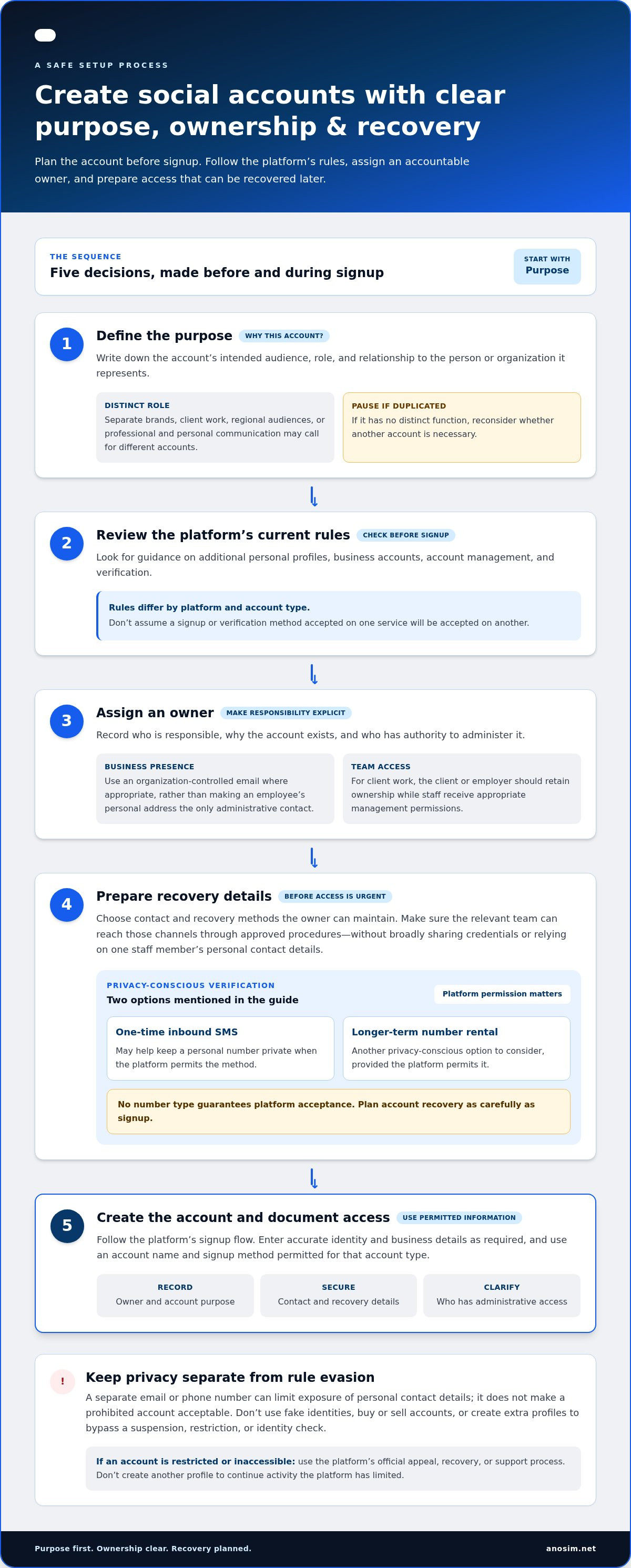
Define the purpose, check the platform’s current rules, assign an accountable owner, prepare recoverable contact details, and then create the account using permitted information. This is a planning framework, not a claim that every platform uses the same signup flow or requirements.
- Define the purpose. Write down the account’s intended audience, role, and relationship to the organization or person it represents. If it duplicates an existing profile without a distinct function, reconsider whether another account is necessary.
- Review the platform’s rules. Look for current guidance on additional personal profiles, business accounts, account management, and verification. Requirements can differ by platform and account type, so don’t assume a method permitted on one service will be accepted on another.
- Assign an owner. Record the responsible person or business, the account’s purpose, and who has authority to administer it. For a business presence, use an organization-controlled email address where appropriate rather than making an employee’s personal address the only administrative contact.
- Prepare recovery details. Decide which email address and other recovery methods the owner can maintain. Make sure the relevant team can access those channels through approved procedures, without broadly sharing credentials or relying on one staff member’s personal contact information.
- Create the account. Follow the platform’s signup flow and enter accurate identity and business details as required. Use an account name and signup method permitted for the account type, then securely record the owner, contact details, and administrative access.
Assign an owner before opening each account
Ownership should be explicit, not inferred from who happened to complete signup. For a client or employer account, document which organization owns the profile and which individuals may manage it. Separate ownership from day-to-day administration: a staff member may publish content without being the only person able to recover the account. This distinction supports continuity if responsibilities change.
Prepare the signup and recovery details
Keep signup records in an approved, access-controlled business system. Store only the details needed to manage the account, and limit access to people with a defined role. Before registration, confirm that the designated email is active and that the owner can recover it. If verification requires a phone number, follow the platform’s stated requirements. A separate number may help protect a personal number when permitted, but acceptance varies. For inbound SMS verification, SMS activation options can be relevant when the platform allows that method.
With purpose, ownership, and recovery planned first, signup becomes a controlled administrative task rather than an improvised one.
Secure each social media account and protect recovery access
Account security involves more than the login password. The email address, authentication method, recovery options, and people with administrative access all affect whether the rightful owner can keep control. A weak point in any of these can turn a routine password reset or staff change into an access problem.
An account is only as recoverable as the email and authentication methods protecting it. Secure the email account first, then apply the same care to each social profile. This layered approach is central to how to create multiple social media accounts safely, especially when several people help manage an organization’s presence.
Protect credentials and authentication
Give every social media account a unique password. Reusing one password means a problem with one account could put others at risk. Generate and store credentials in an approved password manager with access limited to the people who need it. Don’t place passwords in team chats, public documents, or unsecured spreadsheets, even as a temporary convenience.
Enable the platform-supported multifactor authentication (MFA) option for each account, and enable MFA on the associated email account too. Keep backup codes in a secure, access-controlled location, such as the organization’s approved password manager. Don’t leave recovery codes in plain-text notes or a shared file that has broader access than the account itself.
Before relying on a recovery method, confirm that the account owner can still access it. An old employee’s inbox or phone number isn’t a durable recovery plan. If a platform permits role-based access, use individual permissions for team members rather than sharing the owner’s login. This makes it easier to change access without distributing the primary credentials.
Keep ownership and recovery under control
Set a regular review point for account administrators and recovery details. Remove access when someone changes roles or leaves, and update contact methods when the organization changes its systems. Keep the owner in control of the recovery email and phone access, even if a social media manager handles everyday publishing.
Document a recovery procedure in an approved business system. It should identify who is authorized to initiate recovery, where current recovery methods are maintained, and how administrators can be updated. Avoid recording sensitive codes in plain text. Keep the instructions useful without turning the document into a second set of login credentials.
- Review access: Confirm that each administrator still needs their current permissions.
- Test recovery readiness: Verify that the owner can access the registered email and authentication methods.
- Record changes: Note updates to administrators or recovery details in the controlled business record.
These checks help prevent account security from depending on one person’s memory or personal contact details. With unique credentials, protected authentication, and a documented recovery process, each profile is easier to manage without weakening the others.
Manage multiple accounts without confusing privacy with rule evasion
Keeping personal contact details private and limiting account access to trusted staff are reasonable security practices. They’re different from concealing who controls an account or trying to avoid a platform’s enforcement systems. Multiple accounts alone don’t establish a violation; the relevant rules depend on the platform, account type, and how each profile is used.
That distinction should guide the entire workflow. Use privacy controls to protect information and manage legitimate access, not to disguise identities or sidestep restrictions. Avoid proxy rotation, antidetect browsing, automated account creation, or altered identity details as ways to bypass platform checks. These tactics don’t replace permission to use an account or resolve an enforcement decision.
For teams managing several brands or client profiles, official tools offer a clearer way to coordinate. Where a platform provides role-based permissions, give each person an individual account with only the access their work requires. Use platform-supported scheduling or management tools, and follow the platform’s rules for third-party integrations. This keeps activity accountable without passing around one shared password.
Build a clear team workflow
Define who drafts, reviews, and publishes for each account. For example, a team member might prepare a post for a regional brand while an authorized reviewer checks its audience, account, and details before publication. Use an approval step for client content or posts that represent multiple brands. Schedule and review content through permitted tools, and make sure the team knows which account it’s publishing from.
- Use individual permissions: Assign access through official platform tools instead of sharing login credentials.
- Set a review path: Identify who approves content for each brand or client account.
- Check the publishing destination: Confirm the selected profile before scheduling or posting.
Respond to security checks or restrictions appropriately
If a platform presents a security check, restriction, or account notice, pause activity and read the message carefully. Follow the platform’s official verification, appeal, recovery, or support process for the specific issue. Don’t create a replacement account to continue activity that has been restricted, and don’t change identities or technical setups to avoid the decision. Keep a record of the notice and steps taken so the authorized account owner can coordinate any response.
Consistent, transparent workflows are more sustainable than attempts to make accounts appear unrelated. They also make it easier to explain who manages each profile and why it exists. If a platform permits inbound SMS verification and you need a separate number to reduce exposure of a personal one, consider SMS activation options for that verification step. A separate number doesn’t bypass platform rules or guarantee acceptance.
Choose privacy-conscious verification for legitimate social accounts
A separate phone number may help keep a personal number out of a social account’s signup details. It’s a privacy measure, not a way to guarantee anonymity, account approval, or exemption from platform rules. Some services restrict virtual or VoIP numbers for verification, so use one only if the platform permits it and follow its stated signup and identity requirements.
Plan for recovery before choosing a verification method. A number used only to receive an initial code may not remain available for future login checks or account recovery. If ongoing access could be required, choose a method that provides continued access and keep its administration under the account owner’s control. The right choice depends on the platform’s rules and the account’s legitimate needs.
When a separate verification number may help
A distinct number can separate business signups from personal contact details, provided the platform allows it. Don’t treat this separation as a workaround for identity checks or restrictions. If a platform rejects virtual or VoIP numbers, use a permitted method instead. For planning longer-term access, the dedicated virtual number guide discusses considerations for ongoing verification access.
Match the verification option to the use case
For an eligible signup flow that needs a single inbound code, SMS activation can serve as a one-time verification option. It’s different from keeping a number available for future checks. Number rental is more relevant when ongoing access is needed and the platform permits that number type. Neither option guarantees that a platform will accept the number.
Before signup, consider whether the platform may request another code later and whether the number can remain accessible to the account owner. If future recovery depends on that number, a one-time verification method may not meet the account’s needs. Keep a permitted, owner-controlled recovery route in place and don’t rely on a number you can no longer access.
- One-time signup: Consider inbound SMS activation only for a platform-approved verification flow.
- Potential future checks: Consider longer-term number access if permitted and needed for recovery.
- Platform rejection: Use the platform’s accepted verification and recovery processes rather than trying to work around its requirements.
Choosing verification carefully is one practical part of how to create multiple social media accounts safely. The objective is to reduce unnecessary exposure of personal contact details while maintaining legitimate, recoverable access. Explore SMS activation options for inbound verification where a platform permits their use.
Make your next account decision deliberate
Before expanding your presence, treat each new profile as a small operational launch. Start with one account, confirm that its purpose and signup method fit the platform’s current rules, and note what your team would change before applying the process elsewhere. This gives you a practical way to improve your workflow without relying on shortcuts or assuming every platform handles accounts the same way.
That’s the central principle behind how to create multiple social media accounts safely: build a process you can explain, maintain, and adapt as platforms or responsibilities change. If verification is part of your next signup, choose a method based on whether you need a one-time inbound SMS code or continuing number access, and use it only where the platform permits it. Anosim offers inbound SMS verification options, including short-term activation and longer-term number rental.
Explore Anosim SMS activation for a privacy-conscious verification option where permitted. Take the next step with a clear purpose and a setup your team can manage with confidence.
Frequently Asked Questions
Can I create multiple social media accounts with one email address?
Sometimes, but it depends on the platform and account type. Some services allow one email address to manage or connect multiple profiles, while others require a distinct email for each login. Check the signup instructions before registering. If one inbox supports several accounts, use clear labels or folders so security alerts and recovery messages don’t get confused, and ensure the organization retains control of the email address.
How many social media accounts can one person create?
There’s no single account limit that applies across social platforms. A service may allow multiple business profiles but limit personal profiles, or set different rules for particular account types. Before opening another account, review that platform’s current policy and consider whether the new profile has a distinct purpose. If you manage accounts for clients, use the platform’s permitted delegation tools rather than creating personal profiles to represent each client.
Can I use the same phone number for multiple social media accounts?
Possibly, but platform rules and verification limits vary. A number might already be linked to another profile, or a service may restrict how often it can be used for verification. Before relying on one number, check whether it can support the accounts you manage and whether you’ll retain access to it. For a business, avoid making an employee’s personal number the only route to account recovery.
Are virtual phone numbers safe for social media verification?
They can be a privacy-conscious option if the platform allows them, but acceptance isn’t guaranteed. Some services restrict virtual or VoIP numbers, and a number used for a one-time code may not be available for future verification. Anosim provides inbound SMS verification options, including short-term activation and longer-term number rental. Choose based on the platform’s requirements and whether the account needs continuing access to its verification number.
Should I use a VPN or proxy when managing multiple social media accounts?
Don’t use a VPN or proxy to disguise account ownership, avoid platform checks, or work around restrictions. For routine account management, use the platform’s supported access and team-management options. If you use a privacy tool for a separate, legitimate network-security reason, keep its purpose distinct from account creation and follow the platform’s rules. Changing network routes doesn’t make an otherwise disallowed account or action compliant.
What should I do if one of my social media accounts is restricted?
Read the restriction notice and follow the platform’s stated review or appeal process. Save the notice and any relevant account details so you can explain the situation accurately. Don’t open a replacement profile to continue the activity covered by the restriction, since that may create another policy issue. If the notice appears to involve a compromised account, use the platform’s official recovery flow and secure the associated email account as well.
How can a business keep social media accounts when an employee leaves?
Make sure the business, not an individual employee, controls the email and recovery channels associated with each account. When someone leaves, remove their platform permissions, revoke any active sessions or connected app access the platform lets you manage, and update shared credentials if they had access. Confirm another authorized administrator can still manage the profile. Keeping a current account inventory helps identify access that might otherwise be overlooked.
Is it safer to use a separate email for each social media account?
A separate email can make account alerts easier to sort and reduce the impact of an inbox issue, but it also creates more credentials and recovery details to maintain. A controlled business mailbox or managed aliases may be practical if the platform permits them and the organization can reliably administer them. For how to create multiple social media accounts safely, prioritize recoverable, organization-controlled email access over creating extra inboxes that no one monitors.