
Yes, receiving international verification codes is usually possible if your home SIM stays active and connects to a cellular network abroad. You can often turn off data roaming while keeping the line enabled to receive standard SMS, but delivery depends on your carrier and plan. Banks may also block codes when they detect access from an unusual location.
It’s frustrating when a bank code doesn’t arrive just as you need to sign in or approve a transaction. This guide explains how to keep your usual number available abroad, what to consider before relying on a temporary number or phone-number eSIM, and how to troubleshoot missing messages. You’ll also learn when an authentication app or backup codes can offer another way to access important accounts.
Key Takeaways
- Keep your home SIM active and connected to a mobile network to receive standard bank texts abroad; data roaming is generally not needed for incoming SMS.
- Before relying on an eSIM, distinguish a data-only plan from one that includes a phone number and supports SMS reception.
- Temporary numbers can be rejected by banks, and access may end when the number or plan expires, so consider a separate authentication method for important accounts.
- If a code doesn’t arrive, check that the relevant SIM is enabled and connected, then retry after refreshing the phone’s network connection.
- For a separate verification need, Anosim’s SMS Activation and number-rental offerings provide another option to consider.
Table of Contents
- Receiving bank SMS and 2FA codes abroad
- Receiving bank OTP and verification codes overseas
- Temporary numbers and account verification
- Troubleshooting missing verification codes
- Which countries and mobile carriers support receiving verification codes abroad?
- Anosim: SMS Activation
Receiving bank SMS and 2FA codes abroad
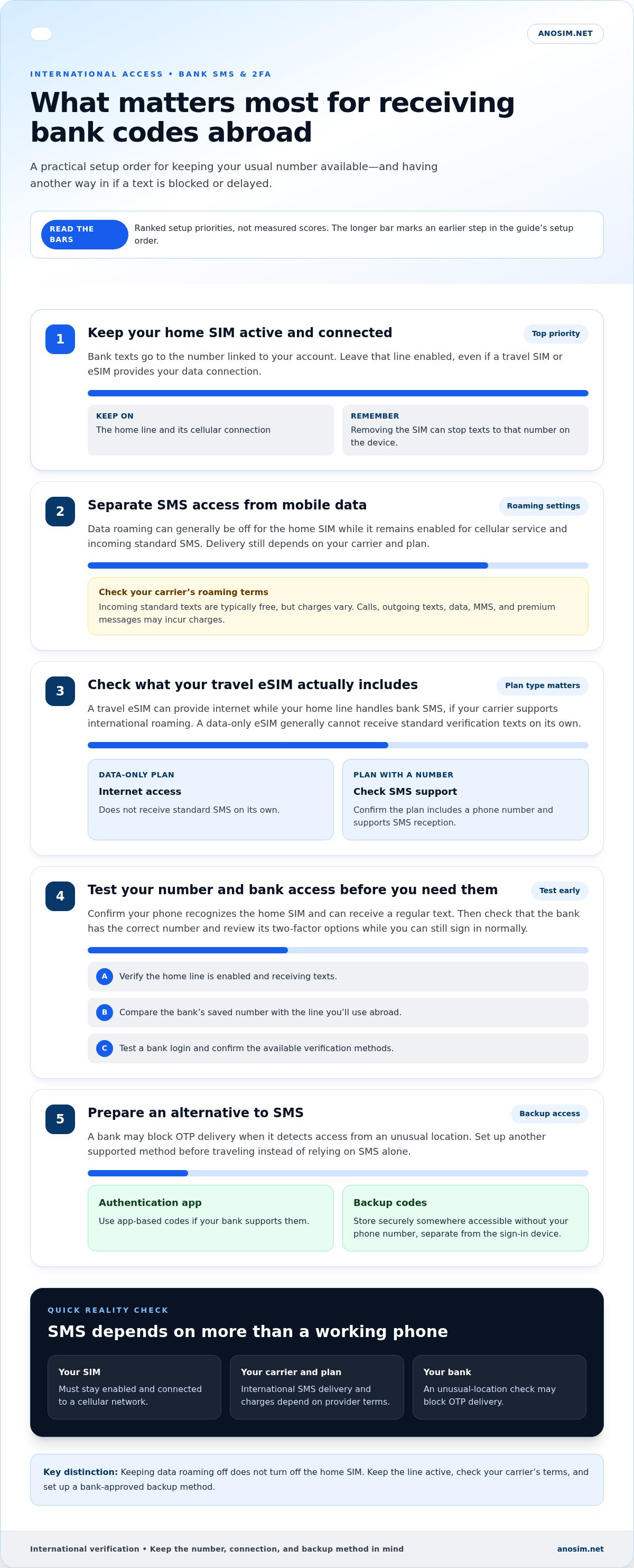
- Keep your home SIM active and connected to a cellular network. Bank SMS codes go to the phone number linked to your account, so turning off that SIM stops messages from reaching it. Keeping the home line enabled is essential for receiving international verification codes abroad. In your phone settings, leave the home line on even if you use a travel SIM or eSIM for data. If your phone has one SIM slot and you remove the home SIM, your usual number won’t receive texts on that device.
- Turn off data roaming for your home SIM if you want to limit mobile data use abroad. Receiving regular SMS generally doesn’t require data roaming, but the home line still needs cellular service. Incoming standard texts are typically free, although charges vary by provider. Calls, outgoing texts, mobile data, MMS, and premium messages may incur charges. Review your carrier plan’s roaming terms before relying on the line for bank access.
- Set up your travel connection and home line separately. A travel eSIM can provide internet access while your regular SIM remains active for bank SMS, if your carrier supports international roaming. Follow the travel eSIM’s instructions for its roaming settings. Before installing an eSIM, check whether it includes a phone number and supports SMS reception. A data-only eSIM generally can’t receive standard verification texts on its own.
- Test access before you need to approve a bank transaction. While you still have a reliable connection, confirm that your phone recognizes the home SIM and can receive a regular text. Then sign in to your bank and review its two-factor authentication options. A bank may block OTP delivery if it detects access from an unusual location, so prepare an alternative instead of relying on SMS alone. Testing early can reveal setup problems that might affect receiving international verification codes.
- Set up a backup for important accounts before traveling. Install the bank’s authentication app if it supports app-based codes, or store secure backup codes somewhere you can access without your phone number. Keep those codes private and separate from the device you use to sign in. These preparations make receiving international verification codes less dependent on SMS alone. If a bank doesn’t send a text abroad, try its alternative verification method and check whether the account flags the overseas login.
Receiving bank OTP and verification codes overseas
- Confirm which phone number your bank uses for security messages. Open your account settings and compare the saved number with the line you’ll use abroad. Include the country calling code if the bank’s form requests it. For example, if your profile still lists an old number, a working travel connection won’t redirect the verification code to your current phone.
- Review the bank’s verification options before traveling. Some accounts offer an authentication app, push approval, or backup codes alongside SMS. Set up an available alternative while you can still sign in normally. Store backup codes securely, separate from your phone, and don’t send them in an ordinary message or share them with anyone claiming to be bank support.
- Test a bank login before relying on overseas SMS. Sign in from your usual device and confirm that the bank can send a verification code to the registered number. This checks your account’s contact details and your phone’s ability to receive the message. It also gives you time to arrange another sign-in method if the code doesn’t arrive.
- Prepare for location-based security checks. A bank may block OTP delivery when it detects access from an unusual location. If an overseas login triggers an extra review, follow the bank’s on-screen security steps instead of repeatedly requesting new codes. Keep your account details consistent and use the same trusted device when possible. Don’t share a one-time code with anyone who contacts you unexpectedly.
- Use the newest code. If you request another verification code, the earlier message may no longer match the active login attempt. Enter the latest code in the bank’s own app or website, and don’t copy it into a link received by text or email. If a message looks suspicious, open the bank app directly instead of following its embedded link.
- Keep bank SMS separate from data access. A travel eSIM can provide internet while your usual number handles bank texts, provided the home line remains active and your carrier supports roaming. A data-only plan won’t receive SMS on its own. Keep the bank app available over Wi-Fi or travel data, then use the registered line for any SMS step in the login process.
- If SMS remains unavailable, switch to an alternative method configured in your bank account. An authentication app or secure backup code can provide another route when the bank’s text delivery is blocked. If the bank requires its registered number, contact support through the official app or website and follow its account recovery process. Keep access to your email and trusted device during that process.
Temporary numbers and account verification
Alternatives include an authentication app or secure backup codes, if your account supports them. A temporary number may receive a code, but banks and other services can reject temporary or prepaid numbers.
- Identify which account needs a number before choosing one. A bank that sends an OTP to the phone number already on file may not accept a different number during login. For example, a temporary number won’t automatically replace the home number registered with your bank. Check the account’s security settings and use the number it recognizes.
- Separate data access from SMS capability. A data-only eSIM usually has no phone number, so it can’t receive standard SMS verification codes on its own. A phone-number eSIM may support SMS reception, but capabilities vary by plan. Before installing one, check whether it includes a number and can receive SMS, rather than just providing mobile data.
- Check whether a temporary number will be accepted before relying on it. Some banks and online services reject temporary or prepaid numbers, even if they can receive SMS. A code arriving successfully doesn’t prove the service will accept that number for future logins or account recovery. Don’t rely on a temporary number as your only option for an account you need to access long term.
- Consider how long you need the number. A temporary eSIM number may stop working when its plan expires, and it may later be assigned to another user. If an account still sends recovery codes to that number, you could lose access or expose future messages to its new holder. Avoid linking long-term financial access to a number you won’t retain.
- Keep your home number available if you’re traveling with a single-SIM phone. Replacing the home SIM with a local SIM means that device can no longer receive SMS and OTPs on your home number. A separate device or a supported dual-SIM setup can preserve access to the original line. Confirm which SIM receives each account’s messages before changing your setup.
- Set up another verification method for accounts that offer one. An authentication app can generate codes without SMS delivery, while secure backup codes can help when a phone line is unavailable. Enable the method in your account’s security settings before travel, then store backup codes privately. Don’t assume every bank offers the same alternatives.
- Use a temporary number only for an account where its limitations suit your needs. Match the number’s country and validity period to the service’s requirements, and consider whether you’ll need that same number for future sign-ins. If a bank requires the number already registered to your profile, keep using it or choose a verification method the bank supports.
Troubleshooting missing verification codes
- Confirm that the bank has the correct phone number on file. Compare the full number, including its country code, with the active SIM. A digit error or outdated number can send the code elsewhere. If the bank profile shows an old number, use its account recovery process or another available verification method.
- Check that the SIM linked to your bank number is switched on. A disabled SIM can’t receive SMS on its associated number. On a dual-SIM phone, open the SIM settings and identify each line by its number or label. Don’t assume the travel line is also the one receiving bank messages.
- Check the phone’s cellular connection, not just its internet access. Wi-Fi or a data eSIM can load the bank app while the home line has no mobile signal. Look for the home carrier’s name or a network indicator. If the line shows no service, move somewhere with coverage and check again.
- Refresh the phone’s network connection by turning on airplane mode for 30 seconds, then turning it off. Wait for the home SIM to reconnect before requesting another code. This resets the device’s network connection without deleting the SIM. Confirm the phone has service before returning to the bank’s sign-in screen.
- Review your messaging app’s inbox and filtering settings. Search for the bank’s sender name or short code, and check blocked or filtered messages if your phone has those folders. Confirm the SMS app can receive other messages. If ordinary texts arrive but the bank’s code doesn’t, the issue may be with the bank’s delivery route or security checks.
- Request a fresh verification code once the phone is connected. Enter the newest message in the active bank session instead of using an earlier code. If the bank offers app-based verification or backup codes, use that route rather than repeatedly requesting SMS. Keep the code private and enter it only in the bank’s official app or website.
- If messages still fail, distinguish a phone-network problem from an account-delivery problem. Ask someone to send a standard text to the active number, then see whether it arrives. If no standard SMS arrives, contact your home carrier through its official channel about roaming and incoming texts. If other texts arrive, use the bank’s official support or account recovery process.
Which countries and mobile carriers support receiving verification codes abroad?
- Check your home carrier’s international roaming support for every destination. Receiving texts on your usual number depends on your carrier and plan, not just coverage from the local network. A plan may connect in one destination but behave differently in another. Review the countries on your itinerary and confirm that your line can register on a partner cellular network in each one.
- Map your route before traveling across several borders. For example, a traveler visiting 3-4 countries in 2 weeks should consider whether the home SIM can stay connected throughout the trip. Each border crossing may involve a different local network. Keep the home line active and watch for a carrier name or signal indicator after arrival in each country.
- Keep your regular SIM available if you use a travel eSIM for mobile data. This can let the travel eSIM provide internet while the home line receives texts on your usual number, if your carrier supports international roaming. Give each line a clear label in your phone settings, such as “Home” and “Travel,” to avoid disabling the wrong SIM.
- Manage roaming settings separately for each line. Follow the travel eSIM plan’s instructions for its roaming settings, and manage data use on the home SIM separately. Receiving a standard SMS generally doesn’t require data roaming, but the home line must remain connected to a cellular network. Don’t switch that SIM off if bank codes still go to its number.
- Check the eSIM’s phone number and validity before depending on it for verification. A data-only eSIM usually has no number for standard SMS. A phone-number eSIM may support SMS reception, but banks can reject temporary or prepaid numbers. Match the number’s country and service duration to the account’s requirements.
- Test each connection after arriving in a new country. Check that the home SIM shows service, then request a verification text only when needed. If the phone has no cellular connection, toggle airplane mode to reconnect, then check the network indicator again. Internet access through Wi-Fi alone doesn’t mean SMS can reach your number.
- Prepare an alternative for accounts that must remain accessible. An authentication app or secure backup codes can help when a carrier, plan, or destination prevents SMS delivery. Set up the alternative before departure and store recovery codes privately. For a multi-country itinerary, this reduces your reliance on a single carrier connection at every stop.
Support varies by home carrier, plan, and destination. Your line must be able to connect to a partner cellular network there. Confirm roaming support for every country on your itinerary with your carrier.
Anosim: SMS Activation
Anosim offers SMS Activation and Rent Number for users who need a separate number-based option for receiving verification codes. These services may suit account sign-ups or verification tasks where you prefer not to use your personal number. Banks and other services can reject temporary or prepaid numbers, so keep your bank’s registered number or an approved alternative for essential access.
If your account needs a separate number for a verification task, explore Anosim SMS Activation. Visit Anosim to review the service and choose an option that fits your use case.
Make Your Verification Plan Work for You
Before your next trip, decide which accounts must remain accessible and choose a verification method for each. Planning ahead can prevent a change in your travel connection from interrupting an important bank task. A practical approach to receiving international verification codes also means choosing a number-based option only when it fits the account’s requirements.
Anosim offers SMS Activation, Rent Service, and Rent Number for users who need number-based verification options. Consider these services for verification tasks where a separate number is appropriate, rather than as a substitute for the number your bank requires on file.
If you’re ready to explore an option for your use case, contact Anosim about receiving codes. Choose your next step with a clear view of which accounts depend on your usual number and which can use another method. A little preparation helps you travel with a more deliberate account-access plan.
Frequently Asked Questions
Can I receive SMS verification codes overseas?
Yes, if your usual number’s SIM remains active and registers on a cellular network abroad. Standard texts can reach that number even when you use Wi-Fi for internet access. A bank’s OTP is a separate matter: its security system may restrict delivery or require another authentication method. For an important account, set up an available alternative before travel and keep its recovery details secure.
Does receiving SMS overseas cost money?
Receiving standard SMS abroad is typically free, but charges depend on your home provider and plan. Sending texts, making calls, and using mobile data on the home line can incur roaming charges. MMS and premium messages may also be charged differently from ordinary incoming texts. Check your plan’s roaming terms before travel, especially if you might reply to a message or call a number back.
How can I receive international SMS verification codes while traveling?
Keep the number registered with your account available, and make sure its SIM can connect to a mobile network at your destination. If you use a travel eSIM, assign it to data and leave the home line enabled for texts. For example, label each line “Home” or “Travel” in your phone settings. Keep an authentication app or secure recovery codes ready for accounts that offer them.
Do I need international roaming enabled to receive SMS verification codes?
You generally don’t need data roaming enabled to receive ordinary SMS, but your home SIM must remain active and connect to a cellular network. Data roaming controls mobile internet use, while SMS travels through the mobile network. Settings differ by phone and plan, so manage data separately from the SIM’s ability to register. Don’t switch off the line that receives your account’s codes.
Can virtual phone numbers receive international verification codes reliably?
Some virtual numbers can receive SMS codes, but acceptance depends on the number type and the service sending the code. Banks and other services can reject temporary or prepaid numbers. A number that receives one sign-up code may not work for account recovery later. For a bank account, keep using its registered number or a verification method the bank supports.
Which services block VoIP or virtual numbers for verification codes?
There’s no universal list of services that reject VoIP or virtual numbers. Banks and other online services can screen number types and refuse temporary or prepaid numbers. Restrictions may depend on the account’s verification process, not just the country code. If a service declines a number, use its supported authentication option instead of repeatedly requesting codes for that same number.
How do I troubleshoot verification codes that are delayed or not arriving internationally?
First, confirm the number on your account matches the SIM you’re using, including its country code. Then check that the relevant line is enabled and connected to a cellular network. Refresh the connection by turning airplane mode on for 30 seconds, then off. Request a new code after service returns, and use the latest message. If ordinary texts arrive but bank codes don’t, try another bank-approved sign-in method.
Are there security risks to using public SMS or temporary numbers for account verification?
Yes. A public or shared SMS inbox can expose a verification message to anyone who can access that number. A temporary number can also stop working when its plan expires and may later be assigned to another user. Avoid shared numbers for banking or accounts containing sensitive information. Use a private number or an authentication app, and store backup codes securely.