What if the most reliable way to reduce scraping blocks isn’t changing your IP, but changing how your scraper behaves? If jobs fail after bursts of requests or repeated retries, it’s understandable to look for a network-level fix. But learning how to avoid IP bans when scraping starts with permission and restraint, not trying to hide activity from a site that has blocked it.
A predictable workflow starts with understanding the site’s rules and collecting only data you’re authorized to access. Control request rates, limit concurrency, and pause retries when a server signals that it needs a break. These steps can reduce avoidable blocks, but no setup can guarantee access.
This guide covers how to plan responsible data collection, respond to rate limits and blocks, and decide when to stop, request access, or use an approved data source. It also explains where mobile proxies may fit into authorized workflows and why they don’t replace permission or override a site’s restrictions.
Key Takeaways
- Learn how to avoid IP bans when scraping by defining what you’re authorized to collect before configuring your scraper.
- Set conservative request limits, monitor server responses, and adjust concurrency to reduce avoidable blocks.
- Understand why changing IPs doesn’t grant permission or replace responsible request management.
- Use a clear response plan when blocked: pause, review diagnostics and site policies, then seek authorization where appropriate.
- Build a reusable workflow with defined scope, monitoring, stop conditions, and an escalation path for approved projects.
Table of Contents
- How to avoid IP bans when scraping starts with permission
- Control scraping requests to reduce avoidable blocks
- Why IP rotation alone cannot prevent scraping bans
- What to do when a scraper receives an IP ban
- Build a compliant scraping workflow that stays reliable
How to avoid IP bans when scraping starts with permission
An IP ban is a site’s decision to restrict requests associated with an internet address. It’s an access-control response, not simply a technical error to work around. Responsible scraping means collecting only data you’re allowed to access and following the site’s stated conditions. Ban evasion means trying to continue after access has been denied, for example, by switching network addresses to get around an explicit block. No IP, proxy, or request pattern guarantees access.
Web scraping broadly describes automated extraction of information from websites. That definition doesn’t establish permission to collect data from a particular site. Publicly viewable pages, authenticated content, and prohibited automated access are different situations. A page being visible without a login doesn’t automatically mean every method of collecting or reusing its data is allowed. Check the site’s terms and applicable rules before building a collection workflow.
Check access rules before sending automated requests
Start with the site’s terms, robots.txt guidance, API documentation, and any published crawl policy. Treat robots.txt as a signal of the site’s crawling preferences, not as legal authorization to collect data. If an official API or data feed meets your needs, use it. For projects that require access beyond published allowances, seek written authorization before sending automated requests.
Record the permitted pages, data fields, purpose, and conditions you need to follow. This gives your scraper a clear scope and makes it easier to identify requests that fall outside the approved workflow. If the policy is unclear, don’t assume that technical accessibility is permission.
Identify signals that mean you should stop
An explicit denial, an access-control challenge, or repeated rate-limit responses calls for a pause and review, not an attempt to evade the restriction. A temporary service error may have a different cause, but uncertainty isn’t a reason to keep probing the same restricted endpoint. Pause requests, inspect the response, and resume only when you understand the issue and access remains permitted.
Keep a concise diagnostic record with the response code or message, timestamp, target URL or endpoint, and action taken. For example, note whether the scraper paused after a rate-limit response or stopped after an explicit denial. This record helps distinguish transient failures from deliberate restrictions and supports a responsible decision about whether to wait, adjust within permitted limits, or request authorization. That’s the practical foundation of how to avoid IP bans when scraping: respect the site’s boundaries rather than trying to conceal requests.
Control scraping requests to reduce avoidable blocks
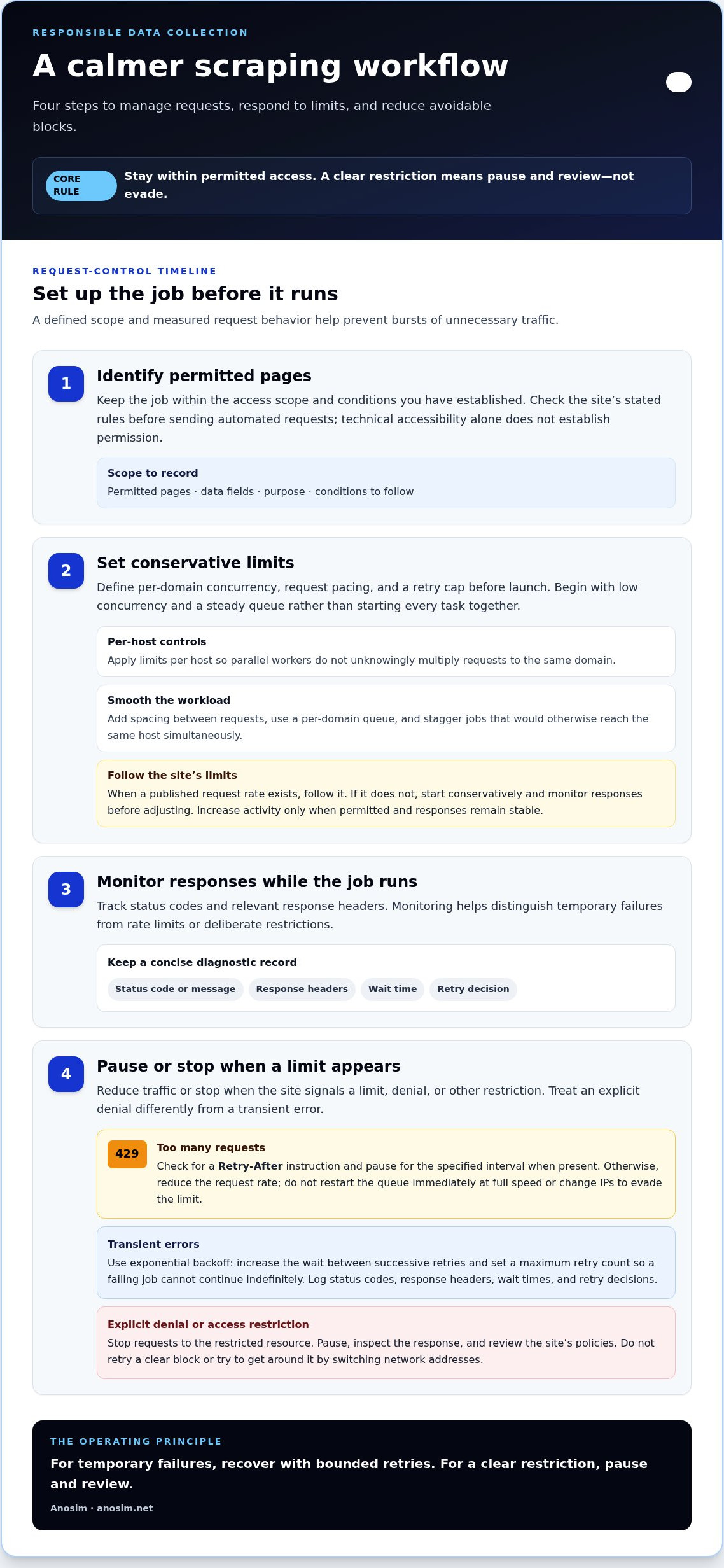
Careful pacing makes data collection more predictable and reduces unnecessary load on a site. Before a job runs, set its scope and behavior so a slow response or rate limit doesn’t trigger a burst of retries. Use this setup sequence:
- Identify permitted pages. Keep the job within the access scope and conditions you’ve established.
- Set conservative limits. Define per-domain concurrency, request pacing, and a cap on retries before launching.
- Monitor responses. Track status codes and relevant response headers while the job runs.
- Pause when needed. Reduce traffic or stop if the site signals a limit, denial, or other restriction.
Excessive concurrency can send many requests to one host at once. Sudden bursts and synchronized jobs can also create unnecessary load and trigger defensive controls. A per-domain queue helps smooth demand, and any adjustments should stay within the site’s published limits. When a site specifies a request rate, follow it. If it doesn’t, begin conservatively and monitor responses before making changes.
Set conservative pacing and concurrency
Begin with low concurrency and a steady queue rather than launching every task together. Apply limits per host, not just across the whole scraper, so parallel workers don’t unknowingly multiply requests to the same domain. Add spacing between requests and stagger scheduled jobs that would otherwise hit the same host simultaneously. Increase activity only when permitted and responses remain stable. If the site’s policy sets a lower rate, follow that limit.
Handle HTTP 429 and other block signals carefully
HTTP 429 indicates that the client has sent too many requests within a given period. Check the response for a Retry-After instruction and pause for the specified interval when present. Otherwise, reduce the request rate and avoid restarting the queue immediately at full speed. Don’t change IPs to evade a rate limit.
For transient errors, use exponential backoff: increase the wait between successive retries and set a maximum retry count so a failing job can’t continue indefinitely. Log status codes, response headers, wait times, and retry decisions to make failures diagnosable. Treat an explicit denial differently: stop requests to the restricted resource rather than retrying it.
Retrying harder after a clear block isn’t responsible recovery. In practice, how to avoid IP bans when scraping is partly about making the scraper respond to limits with less traffic, not more. A bounded retry policy can help with temporary failures. A clear restriction calls for a pause and review.
Why IP rotation alone cannot prevent scraping bans
Changing an IP address changes the route a request takes. It doesn’t change whether the site permits that request, expand the pages you’re authorized to access, or cancel an existing restriction. Sites may assess activity using request patterns, sessions, account context, and other signals, so changing an address alone can’t ensure access. To understand how to avoid IP bans when scraping, prioritize authorized access and controlled request behavior over network changes.
Use network infrastructure only for a legitimate, permitted purpose. Mobile proxies route traffic through mobile network infrastructure, which may be useful for authorized network testing or operations that genuinely require that route. Similarly, services like VPN Secure encrypt internet traffic across devices to protect general network communication, but neither a VPN nor a proxy overrides site terms, clears a denial, or guarantees uninterrupted access. If a site blocks or challenges requests, don’t rotate addresses to continue against that restriction.
What mobile proxies can and cannot do
A proxy sits between a client and a destination, routing traffic through another network connection. That can support approved testing across network environments, but it doesn’t provide permission to scrape. Even in advanced enterprise scenarios—such as deploying Quantum Infinity for stealth tunneling—site access rules and controls still remain in force. Treat proxy and network infrastructure as one component of an authorized workflow, not a way to defeat a block or conceal prohibited collection.
- Request pacing and per-domain limits: the legitimate purpose is to keep authorized collection controlled and reduce avoidable load; the important limitation is that it doesn’t authorize collection beyond the site’s rules.
- Official API or approved data feed: the legitimate purpose is to access data through a route provided for that purpose; the important limitation is to follow its scope, conditions, and usage limits.
- Written permission or scoped agreement: the legitimate purpose is to clarify access for restricted or high-volume projects; the important limitation is to stay within the agreed pages, data, and conditions.
- Mobile proxy infrastructure: the legitimate purpose is to support authorized network testing or operations; the important limitation is that it changes the network route, not permission or access decisions.
Choose the right route for legitimate data access
If an official API or approved feed covers the information you need, use that route and follow its documented limits. For restricted pages or high-volume collection, obtain written authorization and define the project’s scope before running a scraper. Consider proxy infrastructure only when an approved workflow has a genuine network requirement. If access is denied, stop and resolve authorization rather than switching IPs to keep collecting.
The distinction is straightforward: request controls shape how authorized collection behaves, while IP changes only alter the connection path. Neither a new address nor a proxy turns a prohibited request into a permitted one.
What to do when a scraper receives an IP ban
A block is a signal to stop and diagnose, not a prompt to switch addresses and retry. Pause the affected job first. Then capture enough information to understand what happened, review the site’s access policy, and decide whether collection can continue through an authorized path.
- Pause collection. Stop workers targeting the affected host so retries and scheduled jobs don’t add traffic.
- Capture diagnostics. Record the response code and message, timestamp, target URL, request volume, and relevant response headers.
- Review the cause and policy. Check whether the response appears to be a temporary rate limit or an explicit denial, and look for published recovery instructions.
- Choose a permitted next step. Seek authorization where appropriate, or remove the target from the job and use an approved data source.
A rate-limit response may indicate that the request pace needs review, while an explicit denial indicates restricted access. Don’t repeatedly probe the endpoint to determine which one it is. If the response is unclear, keep the job paused and use the site’s published guidance or an appropriate contact path.
Diagnose the response without escalating traffic
Use the logs to check for a configuration error, an unintended request loop, or too many parallel tasks targeting one host. Compare the recorded request volume and timestamps with the job schedule. This can reveal whether a crawler retried failed requests too quickly or several workers ran at once. Don’t switch IP addresses or accounts to continue after an explicit denial. That won’t resolve the restriction.
Resume only through an authorized path
Follow published recovery instructions or request written permission from the site owner if the project requires continued access. If permission is denied, stop collecting from that target and consider an official API or licensed dataset that covers the information you need. Before any permitted restart, document the corrective action, such as reducing concurrency, fixing a loop, or changing the job scope. Set a clear stop condition so the same failure doesn’t trigger uncontrolled retries.
If an authorized workflow genuinely requires mobile network infrastructure, review Anosim’s mobile proxy technical guide. A proxy can support a legitimate network-use case, but it doesn’t grant scraping permission or guarantee access. A disciplined pause-and-review process is a practical part of how to avoid IP bans when scraping, and it helps keep recovery from becoming an attempt to evade a site’s controls.
Build a compliant scraping workflow that stays reliable
A reliable workflow makes the operating rules visible to both the scraper and the people responsible for it. Keep a record of each data source, the pages and fields in scope, the access conditions, and the person or team responsible for resolving questions. Update that record when permissions, site policies, or job settings change. It gives operators a clear reference when a collection job behaves unexpectedly.
Use this checklist before launch and during routine reviews:
- Permission: Confirm the access route is allowed, and retain any written authorization or approved API terms.
- Scope: List permitted pages, data fields, purpose, and exclusions. Keep the job from expanding beyond that scope.
- Request limits: Set per-domain pacing, concurrency limits, and bounded retries in the job configuration.
- Monitoring: Track request volume, response codes, error rates, and pauses at the job level.
- Stop conditions: Prevent automatic retries after an explicit denial or access restriction.
- Escalation: Keep a contact path for approved projects so operators know where to direct access questions or unexpected restrictions.
Document changes as they happen. For example, record why a request limit was adjusted, which job version changed, and who approved a scope update. That history helps distinguish a deliberate, authorized change from accidental configuration drift.
Monitor jobs and make stop conditions explicit
Monitoring should lead to a defined action, not just a dashboard. Set alerts for repeated rate limits, access denials, rising error rates, or a job that pauses unexpectedly. Configure explicit restrictions to halt requests to the affected target and require operator review before any restart. This prevents a retry loop from turning a single response into sustained unwanted traffic.
Use network infrastructure only within the approved scope
Choose network infrastructure to meet documented operational requirements, not to continue after a site has denied access. Mobile proxies can be relevant to authorized network-use cases, but they don’t provide permission or guarantee access. Review mobile proxy service information only if that infrastructure fits an approved workflow. For integration details related to Anosim services, consult the Anosim API documentation. API documentation doesn’t authorize scraping a third-party site. If a platform also asks for a phone number, Anosim offers one-time numbers for SMS verification.
The practical answer to how to avoid IP bans when scraping is to build in clear boundaries, measured request controls, and a reliable stop path. When collection rules or access change, pause the affected job, update its documented scope, and resume only through an authorized route.
Make responsible scraping part of the workflow
Reliable collection depends on clear permission, controlled requests, and a defined response when a site signals a limit or denies access. The practical answer to how to avoid IP bans when scraping isn’t to hide the scraper. Stay within the approved scope, monitor job behavior, and stop when access is restricted.
Keep source policies, authorization, request limits, and escalation steps documented so your team can diagnose failures and make careful changes. IP rotation alone doesn’t grant access or prevent a site from restricting requests. Mobile proxy access through Anosim’s partner proxied.com may support authorized network requirements, while its API documentation provides integration context for Anosim services. Neither replaces permission to collect data from a website.
If your approved workflow has a genuine network infrastructure need, explore proxied.com mobile proxies for authorized workflows. Build the boundaries in first so you’re prepared to keep collection predictable and responsible.
Frequently Asked Questions
Can rotating proxies prevent an IP ban when scraping?
No. Rotating proxies can’t prevent a site from restricting access or make prohibited scraping permissible. A proxy changes the network route, not your authorization. Sites may also consider request patterns, sessions, or account context, so changing addresses may not resolve a block. Use proxy infrastructure only for an authorized network need, and don’t rotate IPs to continue after an explicit denial or evade access controls.
Is web scraping legal if the information is publicly available?
Public availability doesn’t automatically make every scraping activity lawful. In the United States, collecting publicly accessible data is generally treated differently from accessing data behind authentication, but other issues may apply, including contractual terms you’ve accepted and data privacy rules. Legal outcomes depend on the facts and jurisdiction. Review the site’s terms and applicable requirements, and seek qualified legal advice for a project with material risk.
What should I do if a website returns HTTP 429?
HTTP 429 means the server is rate-limiting requests, so pause or reduce traffic rather than increasing concurrency or switching IPs. Check the response for a Retry-After instruction and follow it. If none is provided, wait before making another permitted attempt, use bounded retries for temporary errors, and log the response details. Stop if rate limits persist or the site indicates access is denied.
How can I tell whether my scraper is blocked or the website is temporarily down?
Check the response code and message, relevant headers, and whether the failure affects one endpoint or the wider site. An explicit denial, access-control challenge, or repeated rate-limit response suggests a restriction. A service error may be temporary, but it isn’t proof that continued requests are welcome. Record the timestamp and target, pause the affected job, and consult published guidance. Don’t repeatedly probe a restricted endpoint to test it.
Does robots.txt give permission to scrape a website?
No. A robots.txt file communicates crawling preferences and may identify paths a site asks automated crawlers to avoid, but it doesn’t grant legal permission to collect or reuse data. Review it alongside the site’s terms, crawl policy, and API documentation. If access conditions remain unclear or your intended collection goes beyond published guidance, use an approved data route or seek authorization before proceeding.
Can a website block a scraper using signals beyond its IP address?
Yes. A site may consider request patterns, sessions, account context, or other signals when deciding whether to restrict access. The exact controls vary by site and aren’t always visible to a scraper. That’s why IP rotation alone can’t ensure continued access. Keep requests within the permitted scope, respond carefully to rate limits, and treat an access challenge or explicit denial as a reason to pause and review.
When should I stop scraping and request permission?
Stop when the site explicitly denies access, presents an access-control challenge, repeatedly rate-limits requests, or its published policy prohibits your planned activity. Pause the job, record the response and relevant diagnostics, then review the site’s terms and recovery guidance. If the project still requires access, seek written authorization before restarting. If permission isn’t granted, remove the target and consider an official API, approved feed, or licensed dataset.